
User's Manual



2-20
Table 2-15 Configuration items of configuring other actions for a traffic behavior
Item Description
Please select a behavior
Select an existing behavior in the drop-down list.
Filter
Configure the packet filtering action.
After selecting the Filter option, select one item in the following
drop-down list:
z Permit: Forwards the packet.
z Deny: Drops the packet.
z Not Set: Cancels the packet filtering action.
Return to QoS policy configuration task list
.
Creating a Policy
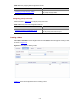
Select QoS > QoS Policy from the navigation tree and click Create to enter the page for creating a
policy, as shown in Figure 2-16
.
Figure 2-16 The page for creating a policy
Table 2-16
describes the configuration items of creating a policy.
Table 2-16 Configuration items of creating a policy
Item Description
Policy Name
Specify a name for the policy to be created.
Return to QoS policy configuration task list
.
Configuring Classifier-Behavior Associations for the Policy
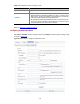
Select QoS > QoS Policy from the navigation tree and click Setup to enter the page for setting a policy,
as shown in Figure 2-17
.