
User's Manual




1-13
Return to Configuration task list for requesting a certificate automatically.
Requesting a Local Certificate
Select Authentication > PKI from the navigation tree, and then select the Certificate tab to enter the
page displaying existing PKI certificates, as shown in Figure 1-6
. Click Request Cert to enter the local
certificate request page, as shown in Figure 1-11
.
Figure 1-11 Local certificate request page
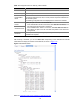
Table 1-7 describes the configuration items for requesting a local certificate.
Table 1-7 Configuration items for requesting a local certificate
Item Description
Domain Name
Select the PKI domain for the certificate.
Password
Type the password for certificate revocation.
Enable Offline Mode
Select this check box to request a certificate in offline mode, that is, by an
out-of-band means like FTP, disk, or e-mail.
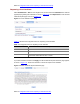
If you select the offline mode and click Apply, the offline certificate request information page appears,
as shown in Figure 1-12
. Submit the information to the CA to request a local certificate.
Figure 1-12 Offline certificate request information page
Return to Configuration task list for requestin
g a certificate manually.