
User's Manual






1-3
Configuring Management IP Address
Modifying the management IP address used for the current login will tear down the conne
ction to the
device. Use the new management IP address to re-log in to the system.
A management IP address is the IP address of a VLAN interface, which can be used to access the
device. Y
ou can also set configure a VLAN interface and its IP address in the page you enter by
selecting Network > VLAN Interface. For configuration details, refer to VLAN Interface Configuration.
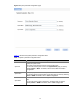
After finishing the configuration, click Next to ente
r the management IP address configuration page, as
shown in Figure 1-3
.
Figure 1-3 Mana
gement IP address configuration page
Table 1-2
describes the configuration items for configuring a management IP address.