
User's Manual




1-18
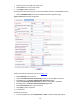
z From the navigation tree, select Authentication > AAA. The domain setup page appears. Perform
the following configurations as shown in Figure 1-18
.
Figure 1-18 Create an ISP domain
z Enter test in the Domain Name textbox.
z Select Enable to use the domain as the default domain.
z Click Apply to finish the operation.
# Configure the AAA authentication method for the ISP domain.
z Select the Authentication tab. Perform the following configurations as shown in Figure 1-19.
Figure 1-19 Configure the AAA authentication method for the ISP domain
z Select the domain name test.
z Select the Default AuthN checkbox and then select RADIUS as the authentication mode.