
User's Manual






1-6
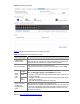
Figure 1-5 The Select VLAN tab
Table 1-4
describes the configuration items of selecting VLANs.
Table 1-4 Configuration items of selecting VLANs
Item Description
Display all VLANs
Display a subnet of all configured VLANs
Select one of the two radio buttons:
z Display all VLANs: displays all configured VLANs.
z Display a subnet of all configured VLANs: type the
VLAN ID(s) to be displayed.
Return to VLAN configuration task list (approach I)
.
Modifying a VLAN
Select Network > VLAN from the navigation tree and click Modify VLAN to enter the page for
modifying a VLAN, as shown in Figure 1-6
.