
- LG Software Innovations Two-Way Radio User Manual

7-14 COPYING
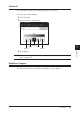
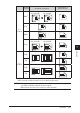
Combine
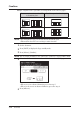
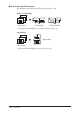
Multiple originals can be copied into an arrangement on one sheet of paper.
Document orientation on the ADF
or document glass
Result image of combined copy
• In case of 2-in-1
• In case of 4-in-1
NOTE: • For enlargement copy, you can only use the document glass.
• This machine does not have an image rotation function.
1
Set the document.
2
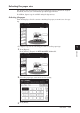
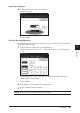
Press [COPY] to display the Copy standby mode.
3
Press [Others], [Combine].
NOTE: You can assign [Combine] to the soft key. See “Soft keys” on pages 10-2 to 10-6.
4
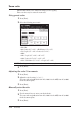
Select the number of document to be combined on to one sheet of paper.
• When you set an advanced function, proceed to step 5.
• When you do not set an advanced function, proceed to step 8.
5
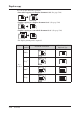
Press [Advance].