
- LG Software Innovations Two-Way Radio User Manual

11-19RESTRICTING USE OF THE MACHINE
1
2
3
4
5
6
7
8
9
10
11
12
13
AI
RESTRICTING USE OF THE MACHINE
Printing a list of department management settings
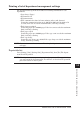
The department management list includes the following information for each
department:
• Copy charge ($/page)
• Department code
• Department name
• Total communication time (in hours, minutes and seconds; h:mm:ss)
Counts the communication time up to 999:59:59 (999 hours:59 minutes:59
seconds). If the fax exceeds the maximum time, it will stop counting.
• Total fax pages printed
Counts the pages up to 999999 pages. If the fax count exceeds the maximum
limit, it will stop counting.
• Total pages copied
Counts the pages up to 999999 pages. If the copy count exceeds the maximum
limit, it will stop counting.
• Total copy charge
Counts the copy charge up to 99.99. If the copy charge exceeds the maximum
charge, it will stop counting.
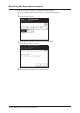
NOTE: If you want to reset the counter, see “Resetting the department counter” on the
next page.
To print the list:
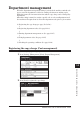
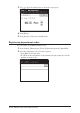
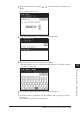
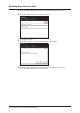
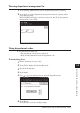
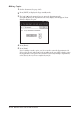
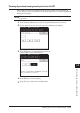
Press [Setting], [List], [Settings List], [Department List], then [Yes]. The depart-
ment list will be printed.
NOTE: If the department management feature has been protected (See page 11-21),
you cannot print the department list. You will have to deactivate the password
protection feature in order to print.